Logging your hours
How to record when you started and finished — during the job or at the end of the day — and how to fix it if you get it wrong.
Two ways to do it
Your hours are what your manager pays you from, so this is the one thing worth getting right every day.
- During the job — tap In Progress when you start and Completed when you finish. Your times are recorded automatically.
- Afterwards — go to the Time tab and type in your start and end time. Just as good, and it is what most people do. It covers the last 7 days, so catch up within the week.
Using the Time tab
The Time tab covers the last 7 days. Two counts at the top — LOGGED and STILL TO LOG — then two lists: Needs Time Logged for jobs you have not entered hours for, and Logged for the ones you have.
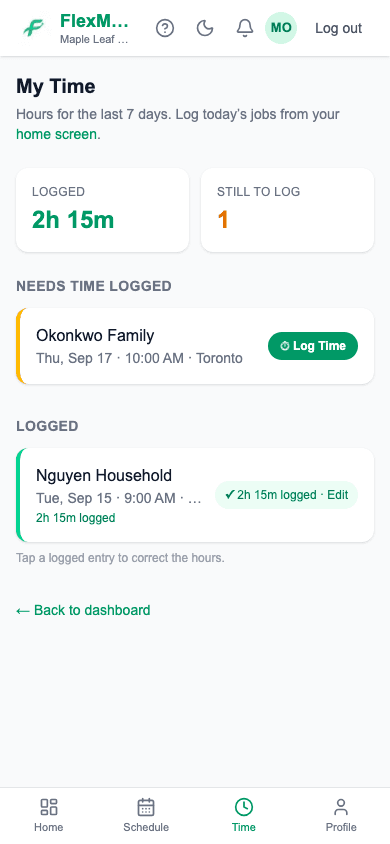
Today's jobs are on your home screen
The Time tab is for catching up on the days behind you. For a job you are finishing now, tap it on Home instead — the page says so at the top and links you there.
Step 1: Tap ⏱ Log Time on the job.
Step 2: Enter your Start time and End time.
Times for that job's date. End time has to be after start time.
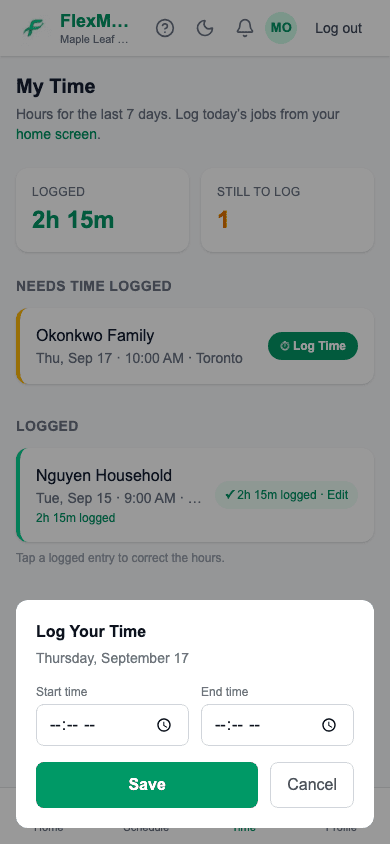
Step 3: Tap Save.
The job is marked completed at the same time, so you do not have to do that separately.
Fixing a mistake
Once hours are saved, the button changes to show the total and says Edit. Tap it, change the times, save again. You can do this yourself — no need to ask anyone.
If you worked with someone else
Everyone on a job logs their own hours. If you stayed an extra half hour, put in your real times — it does not change anybody else's.
Common questions
- I forgot to log a job. Can I still do it?
- If it was within the last 7 days, it is still under "Needs Time Logged" on your Time tab — enter it there. Anything older has dropped off that list, so tell your manager and they can put the times in for you.
- It says end time must be after start time.
- Check AM and PM. This usually means a finish time that reads as earlier in the day than the start.
- Can my manager change my hours?
- Yes, they can correct times on a job. The change is recorded.
- Do I need signal to log my time?
- Yes — it saves straight away, so you need a connection. If you have none, do it when you get signal back.
Related
Still stuck?
Email support@flexmaid.ca and tell us what you were trying to do. A real person answers.