Your profile and days off
Update your details, change your password, and tell your manager which days you cannot work.
Your details
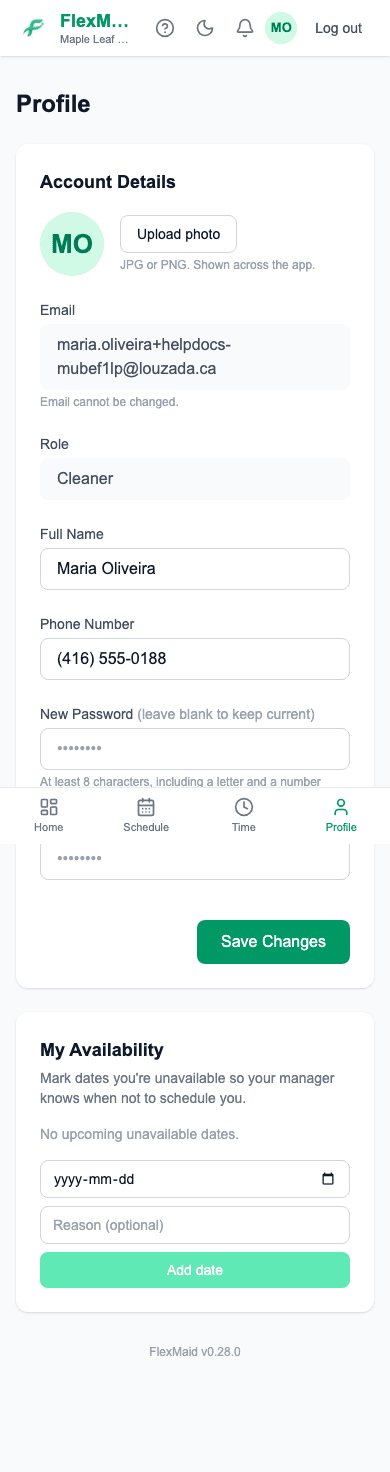
The Profile tab holds your name, your phone number and your photo. Keeping your phone number current matters — it is how the office reaches you.
Marking days you cannot work
Under My Availability, add any date you are not available and, if you like, a short reason. Your manager sees it when they are building the schedule.
Step 1: Pick the date.
Step 2: Add a reason if you want to — "holiday", "appointment".
Step 3: Tap Add date.
This is a heads-up, not a block. It does not stop a job being booked on that day, so if it is important, tell your manager as well.
Changing your password
Change it from your profile whenever you like. If you are locked out entirely, use the forgot-password link on the login page, or ask your manager to set a new one for you.
Common questions
- I was booked on a day I marked unavailable.
- The date is a note to your manager, not a lock. Talk to them.
- My email address has changed. What do I do?
- Ask your manager. Your email address is your login, so it has to be changed for you rather than from your profile.
Related
Still stuck?
Email support@flexmaid.ca and tell us what you were trying to do. A real person answers.